






Remember Me

Recent Uploads

Hot Downloads

Most Popular

Home Jeff's Blog mrProxy Grass
mrProxy Grass PDF Print E-mail
Written by Jeff Patton   
Tuesday, 12 May 2009 18:14

I've seen some stunning examples of rendered grass created with Vray using grass meshes as proxy objects and then scattering those grass proxy objects around.  I tried a similar setup with mental ray and thought I'd share my findings.

I'll begin by showing the render results from using scattered proxy grass objects (click image to enlarge):
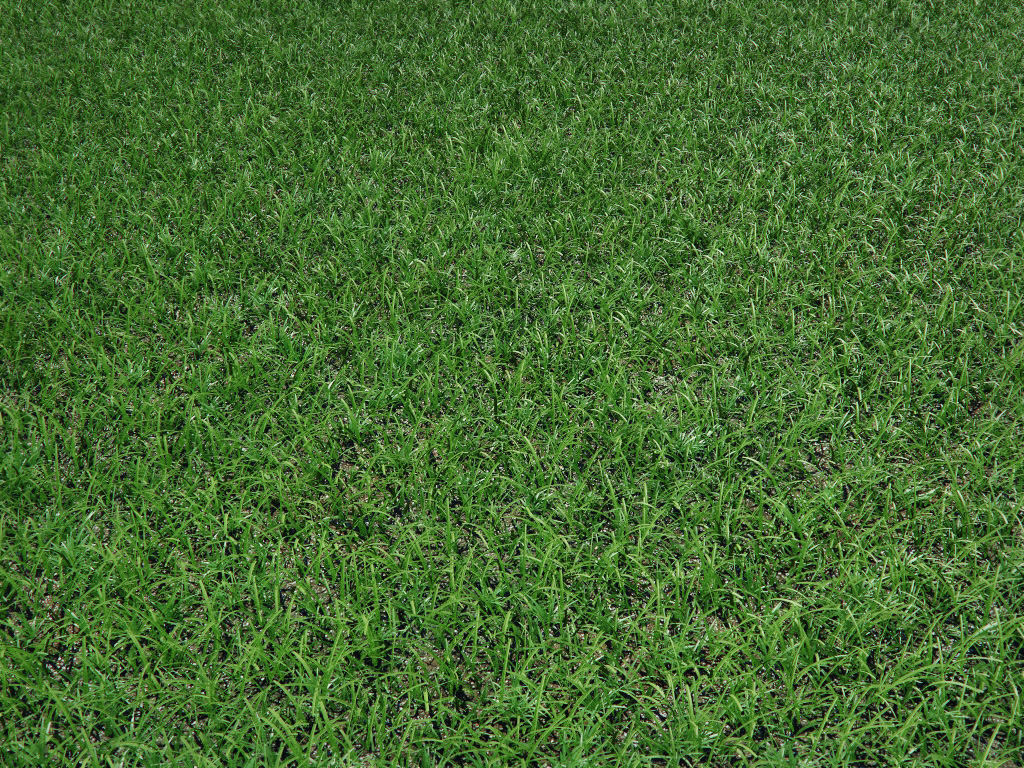
This test really started from a discussion at Vizdepot.com about creating realistic grass in mental ray & 3dsmax, here's a link to that discussion for those that are interested: Vizdepot Link

You can read through that thread for more details on the process but in a nutshell I created some grass patches using the grass-O-matic plugin.  I then converted that grass into an editable poly mesh and wrapped it inside a mental ray proxy object.  I then scatter it manually or with the help of a scatter plugin written by Peter Watje.  Both plugins are available at maxplugins.de

One of the final grass patches that I used is a 5'x5' patch and is quite heavy with geometry at 992,000 tris! Yes, it could be optimized further (always can) but then again just imagine how many actual grass blades are in a 5'x5' area of lush, thick grass.  That being said, I can still easily render several thousand instanced copies of this thick grass proxy object, even though I'm still working on a 32bit Vista machine.

I've uploaded my proxy'fied grass mesh for you to try/use if you want:

Proxy Grass Part01 - Proxy Grass Part02 - Proxy Grass Part03

Trackback(0)
Comments (35)Add comments
Guy Galer wrote on May 13, 2009
 
Title: ...
Thanks for the post. Using your proxy objects - I memory crash with less than 30 instance copies. I switched to BSP2 - max 2009 - 32-bit / XP. No FG / default lights / no shadows.
report abuse
vote down
vote up
website
Votes: -1
Stephen Beckwith wrote on May 13, 2009
 
Title: ...
Jeff,
Don't understand 3zip files 01 to 03 with the same files in or am I missing somthing?
report abuse
vote down
vote up

Votes: +0
Jeff Patton wrote on May 13, 2009
 
Title: ...
It's simply a split .rar file. Unpackage all three into one location to build the single proxy object and it's preview.

I had to split the .rar because there is a limit on the size of files I can post here.
report abuse
vote down
vote up

Votes: +1
Petr wrote on May 14, 2009
 
Title: ...
super...

Now I testing the whole house with a displacement effect.
report abuse
vote down
vote up

Votes: -1
Stephen Beckwith wrote on May 14, 2009
 
Title: ...
Thanks for that I tried to un-zip 1 at a time into the same folder but they kept trying to over wright each other thanks

Steve
report abuse
vote down
vote up

Votes: +0
Jeff Patton wrote on May 14, 2009
 
Title: ...
If you're using winrar all you need to do is simply extract the first file: "jp_grass_proxy.part1.rar". Winrar will then extract/build the file using all three parts into one location for you.

You could also select all three of the files and extract all at once and winrar will know what to do with the files.

If you're not using winrar, then I don't know.
report abuse
vote down
vote up

Votes: +0
Stephen Beckwith wrote on May 14, 2009
 
Title: ...
Yep that's what I thought no problems by the way you've some nice work on hear just a shame I don't live near I'd be over picking your brains.

Thanks Again Steve
report abuse
vote down
vote up

Votes: +0
Jeff Patton wrote on May 14, 2009
 
Title: ...
Glad it's sorted out. Sorry if my first reply about the split rar's added confusion. Thanks for the comment.
report abuse
vote down
vote up

Votes: +0
jonas wrote on May 15, 2009
 
Title: ...
Hi there,

I´ve seen those vray examples, too. They do have the vray 2-sided mat applied. I think your Grass approach could have a slight translucency.

I switched from Vray to MR not long ago.

How´d you create this translucent effect in MR? ...without huge rendertimes.

Jonas
report abuse
vote down
vote up

Votes: +0
Jeff Patton wrote on May 15, 2009
 
Title: ...
I used the FastSSS material in the example render I used in this blog entry. It rendered fine for the example, but as I discuss in the Vizdepot thread I linked to using the FastSSS material on large, complex areas of grass doesn't work well. It takes too long to calculate the lightmap.

I figure I'd use something like a masked self-illuminated material to fake translucence for large areas of proxy grass.
report abuse
vote down
vote up

Votes: +0
patrick anderson wrote on May 17, 2009
 
Title: ...
Cheers for the files Jeff, your mental ray skills are exceptional.
report abuse
vote down
vote up

Votes: +0
Matthew Williams wrote on May 20, 2009
 
Title: ...
Thanks for all the great posts Jeff.

I'm having the same issue as the first comment. I ran out of memory with only 10 instances. Tried switching to BSP2. XP 32, max2010, 2 gigs of ram.
report abuse
vote down
vote up

Votes: +0
Guy Galer wrote on May 20, 2009
 
Title: ...
- Matthew

I had a little better luck by turning off scanline rendering. It still crashes but it takes around 100 instances.
report abuse
vote down
vote up
website
Votes: +0
Matthew Williams wrote on May 26, 2009
 
Title: ...
I've honestly just been finding the proxies to be a bit touchy across the board. Doing a city scene, had 10 buildings proxied in. After closing and re-opening the scene the next day I could no longer select certain buildings if they were in the viewport without crashing max. If I kept them out of the viewport I could use type transform to move them around in a rather ridiculous work around. I could however use their .MIB files to create new proxies to replace them without issue.
report abuse
vote down
vote up

Votes: +0
Mariano wrote on May 28, 2009
 
Title: ...
I been doing some test with mrproxy grass, and correct me if im wrong, but the problem here is no at all the proxy or geometry, its about materials, i think we lack of good shaders to do this, at least to do this as simple as Vray does...
Its hard to believe that we havent something useful without 50 walkaround for this situation, i mean, we need a good shader for grass since ever.. the translucency problem.. ive tried with A&D with huge rendertimes (about 1,5 hours for a 1m x 1m field of grass, on a q6600@3.0ghz 8gb ram) and not near results as this (http://www.flickr.com/photos/pg/3472344463/), and as Jeff said, the FastSSS doesnt work well on large scenes...

If someone have a different approach to solve this, please share it.

cheers-
report abuse
vote down
vote up

Votes: +0
Mariano wrote on May 31, 2009
 
Title: ...
Hi guys, the previous post i can sound kinda frustrated about the process, but of course i've been trying different approaches to solve this in mr, not completely happy with the results, but going forward..
http://www.vizdepot.com/forums...tid=11305

pro mat, fast sss, 1:42 hs , the field is about 8x5 mts.

cheers

Mariano
report abuse
vote down
vote up

Votes: +0
Mariano wrote on May 31, 2009
 
Title: ...
report abuse
vote down
vote up

Votes: +0
Tom Donalek wrote on June 13, 2009
 
Title: ...
Very cool - lots of potential!

I "unRARed" the three files using the free 7-Zip into one .mib file of about 60mb and an image file of grass (with a black border). (I'm not in front of my 3d machine, so I apologize if I'm mis-remembering some of this)

Issue 1) I created a new file with a new mrproxy object and used the "..." button to point to the downloaded file. The image file shows up in the window in the rollout. When I render, I get all the geometry with the app assigned object color. (What dimensions did you expect this to be?) So far so good. I've messed around a bit with adding a color/texture to the grass with so-so results. Also, it seems that the grass mrproxy needs to be on top of a "dirt" base that peeks through between the grass. I'd love some semi-noob suggestions on the texture to be applied to the grass geometry and the dirt surface texture. It seems that "near" needs translucency, etc. and "far" can tolerate a much more simple texture. I'm checking out the Vizdepot thread to see if I can follow that...

Issue 2) I tried 9 instances of the object and got a memory error/crash. (Design2010/32, WinP32, 3GB RAM( While all that geometric detail really is great when the camera is within a few meters of the grass, I'd like to try this technique with even further simplified geometry. is there a way to "extract" the underlying geometry from the file you provided, or -better- is there a way to "open" the proxy and edit the root geometry?

Regardless - thanks very much for your hard work on this really useful and important issue!

An aside: for anyone who hasn't seen this, here's a potentially useful approach:
http://3dsmaxrendering.blogspot.com/2008/05/ultimate-mental-ray-grass-shader.html
report abuse
vote down
vote up

Votes: +0
kudu wrote on June 14, 2009
 
Title: feedback
Jeff,
this is my first post here so i feel nead to thank u for incredible work.

The grass proxy stuff thing

There is one big flipped face which renders black. Not that bad if u sink it in ground plane not visible especially in perspective view.

The thing that i have problem with is if u dont scatter it but if u try to build a grid based surface with instancing or coppying this proxy object proxy_s will rotate around z axis for 45 degrees hence u will get 45 degrees chessboard where every second field is empty in other words u need two times as much instances in order to cover a field, since this is going to turn itself into a RAM_predator it would be nice to try and resolve this issue.

i have made a grid of 5x5 which in metric measurements is around 22mx22m and it could go further on my machine (i is going to list specs at the end) with 1/16 anti aliasing and FG draft mode on 640x640 pixel took 2 and a half min to render which is good potential.

Since nobody else called this one as a thing that happens it must b my mistake, it would b nice to get an answer.

Thankz in advance

k

spes: vista business, intel quad core 2ghz 64bit bus, 4gb ram, quadro fx2700 512mb RAM max2009
report abuse
vote down
vote up
website
Votes: +0
Jeff Patton wrote on June 14, 2009
 
Title: ...
"(What dimensions did you expect this to be?)" - As I described in my blog entry the patch of grass is 5'x5'.

"I tried 9 instances of the object and got a memory error/crash. (Design2010/32, WinP32, 3GB RAM" - I have no clue. I'm using a similar setup 32bit vista and the other day I rendered a scene with over 9000 instanced proxy grass objects without any problems. So I don't understand why some are encountering issues with memory errors unless you're not truly instancing the proxies or not following the proxy optimization tips I've described in previous posts. Also using the FastRasterizer can help for things like grass & hair.

"is there a way to "extract" the underlying geometry from the file you provided, or -better- is there a way to "open" the proxy and edit the root geometry?" - No, you can't edit the proxy geometry. However, it's a simple process to create your own grass patch geometry using the tools I described in my blog entry. This particular patch is too large to be scattered across lumpy terrain so you'll want to make your own smaller patch anyway for scattering on non-uniform geometry.

Texture wise for the grass I'd use a gradient ramp with noise and the new Multi/Sub-Map in 2010 to randomly modify the colors. As mentioned earlier the SSS material would be great to use but on large grass areas it tends to fail or take a LONG time. Perhaps some simulated SSS by use of self-illumination would work, I haven't tried it yet, but in theory it should work. For the ground, I'd probably just use a dirt and/or grass texture map applied to an A&D material since it would be mostly covered by the grass.

"Its hard to believe that we havent something useful without 50 walkaround for this situation, i mean, we need a good shader for grass since ever.. the translucency problem.." - Maybe there's a custom mental ray shader "out there" that would work well. I'll have to look around at maxplugins.de to see.

"There is one big flipped face which renders black. Not that bad if u sink it in ground plane not visible especially in perspective view." - No idea, I don't have that problem here with this proxy object.

"The thing that i have problem with is if u dont scatter it but if u try to build a grid based surface with instancing or coppying this proxy object proxy_s will rotate around z axis for 45 degrees hence u will get 45 degrees chessboard where every second field is empty in other words u need two times as much instances in order to cover a field, since this is going to turn itself into a RAM_predator it would be nice to try and resolve this issue." - Afraid I don't totally understand the question here. I do realize there is a pattern that will appear if you don't rotate this particular proxy object when scattering though so I would recommend rotating it.

You could also use this supplied proxy (or similar) object as a base layer and then scatter a different proxy (perhaps some smaller/taller clumps of grass) on top of this and that would help break up any patterns that appear.

I need to look into some more scatter tools to see if we can make this scatter process easier/faster. Maybe something like GroundWiz from gugila.com would work better.
report abuse
vote down
vote up

Votes: +0
Mariano wrote on June 14, 2009
 
Title: ...
Jeff , try Advanced Painter in randomizer mode, ist like painting grass :), at least to me, its very very good tool and really easy to use. Once you set up the proxy, its just click and paint till you think its dense enough.
report abuse
vote down
vote up

Votes: +0
Danny Jones wrote on June 17, 2009
 
Title: ...
Here's my take on it. Adv painter, mr proxy patch from grassomatic. Tree and sky are vue. 1 min render on dual quad core.
Needs some variation, less manicured. When I get 2010 I'll try the muti-sub mr material on it but until then this will have to work.

http://www.creativeworkshopdes.../grass.jpg
report abuse
vote down
vote up

Votes: -1
Hildevar Martins wrote on June 19, 2009
 
Title: ...
My master jeff! can you share your material used in this test image? i really luv it... my e-mail cad_inho@hotmail.com thx in advance if you can... man i really like this idea of grass... very interesting....
report abuse
vote down
vote up

Votes: +0
Matthew Williams wrote on June 22, 2009
 
Title: ...
Jeff is refering to this post he made earlier:

http://mrmaterials.com/jeffs-blog/54-optimizing-your-scenes-for-mr-proxies.html

Once I realized I wasn't following directions correctly I fixed my scene and now have 6000 instances rendering in 42 seconds.

Thanks a ton Jeff.
report abuse
vote down
vote up

Votes: +0
Grant Noonan wrote on September 04, 2009
 
Title: ...
Hey Jeff,
any chance you could upload that lovely grass shader in your scene? My wife will bake you cookies.
report abuse
vote down
vote up

Votes: +0
Jeff Patton wrote on September 29, 2009
 
Title: ...
Sorry for the late reply Grant. I've been meaning to work on a decent grass material so I'll try to get something put up soon.

(LOL @ the cookie comment)
report abuse
vote down
vote up
website
Votes: +0
Herb wrote on October 01, 2009
 
Title: design visualization specialist
Hi Jeff
this site is awesome. i have been searching for tips and trick for years and the one i just read about optimizing for proxy rendering blew my mind. i tried 80 instances of the proxy grass you supplied and it took 10 minutes to render, changed the BSP to BSP2 and turned off scanline and it took 33 seconds. i almost fell out of my chair. i can not wait to try this setting on future projects.

thanks.
report abuse
vote down
vote up

Votes: +0
Jeff Patton wrote on October 03, 2009
 
Title: ...
@Herb - Glad to hear the info was/is helpful.

@Grant - I think I'm closing in on a grass material.
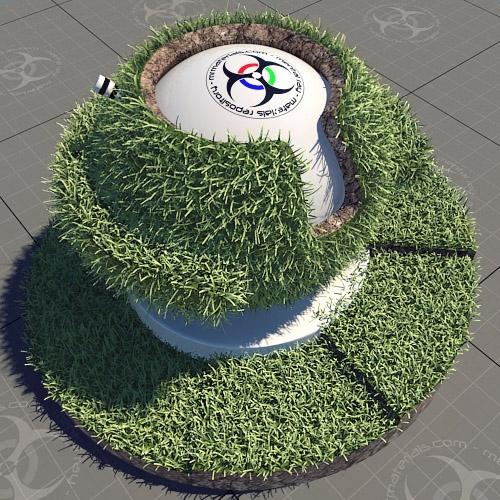
Example (click to enlarge):


There's no SSS on this material, just a translucent A&D setup.

Now I just need to figure out the best way to display it here. Obviously it doesn't look right applied to the current matlab objects.
report abuse
vote down
vote up

Votes: -1
Jeff Patton wrote on October 03, 2009
 
Title: ...
report abuse
vote down
vote up
website
Votes: +0
Grant Noonan wrote on October 07, 2009
 
Title: ...
Jeff,
you are the greatest! I really appreciate you uploading this. Im serious about the cookies, they're killer!
report abuse
vote down
vote up

Votes: +0
Grant Noonan wrote on October 11, 2009
 
Title: ...
jeff,
Are you sure there is no sss in this material? Its one hell of a shader man. The color gradients are really good. It also nice because I can just change the subs to a brown/yellow for a more fallish look. Tis the season!
Thanks again.
report abuse
vote down
vote up

Votes: +0
stenionet wrote on October 18, 2009
 
Title: ...
Thank you very much, Jeff Patton.
Once again you have done a great job.
This material will be very useful.
report abuse
vote down
vote up

Votes: +0
Soeren Staermose wrote on November 08, 2009
 
Title: ...
Hi Jeff ....(and the rest of you guys )
Maybe i missed this reading through the posts, but i would like to know what settings you are using when scattering the proxy ?

(As this is my first post here, i would like to thank you for the great effort here )
report abuse
vote down
vote up

Votes: +0
Jeff Patton wrote on November 09, 2009
 
Title: ...
There are several ways to scatter objects, all with unique settings/methods. If you're going to use the scatter plugin then I would recommend doing the proxy tree scattering tutorial that ships with 3ds Max. It seems to do a good job of explaining the process & scatter plugin settings.
report abuse
vote down
vote up
website
Votes: +0
Andrew wrote on November 26, 2009
 
Title: another scatter query... :)
Hi Jeff... awesome stuff here... the grass nemesis hath been defeated, thanks for your insight!! It gives me hope to get away displacement!

I have a question though that I hope you can give some advice on the best way. I have rolling hills (plane + FFD) that i'd like to populate with grass patches (perpendicularly to the face, corner to corner). I'd like to take the square patches and tile them, maybe with some rotation 90deg at random for variation. Okay noob I know, I've tried advanced painter, it had no auto scatter that I can see. Peter watje's plug-in seems to have issues doing this, even with bounding box collisions and even spacing, it seems to double up on geometry, and max scatter doesn't accept mrProxy objects. I've even tried scattering and dummy object using particle systems and replace with proxy using a script.

In short is there a was to make 10 different grass squares made in grassomatic --> proxy them, and chess board scatter them on a piece a geometric terrain, randomly rotating the proxies to give a random look?

I'm quite sure i'm overlooking a simple thing here, I hope so. Any advice you can give me would be most welcomed, because I saw your images and you seem to have it down!! Thanks!
report abuse
vote down
vote up

Votes: +0

Write comment
You must be logged in to post a comment. Please register if you do not have an account yet.

busy